Sea of Conquest: Pirate War
- 4.1
- Rating
- 5.00M
- Installs
- Free
- Price

 Analysis by App-foxy
I approached Sea of Conquest: Pirate War as a mobile strategy game rather than a quick arcade distraction, and that distinction matters from the first session. It puts you in charge of pirates and fleets, then asks you to make decisions that feel more deliberate than simply tapping through battles. My first impression was that the game wants to be played in short visits, but it rewards players who return with a plan: checking progress, choosing the next improvement, and deciding where limited attention is most useful.
That makes it appealing if you enjoy naval adventure wrapped around role-playing and strategy. It is less convincing for anyone looking for a completely offline-feeling game with instant action and no waiting, menus, or long-term resource decisions. The free download is easy to try, and the Teen content rating gives it a broad audience, but the experience becomes much more demanding once you start caring about fleet growth and efficient progression.
Getting started without losing momentum
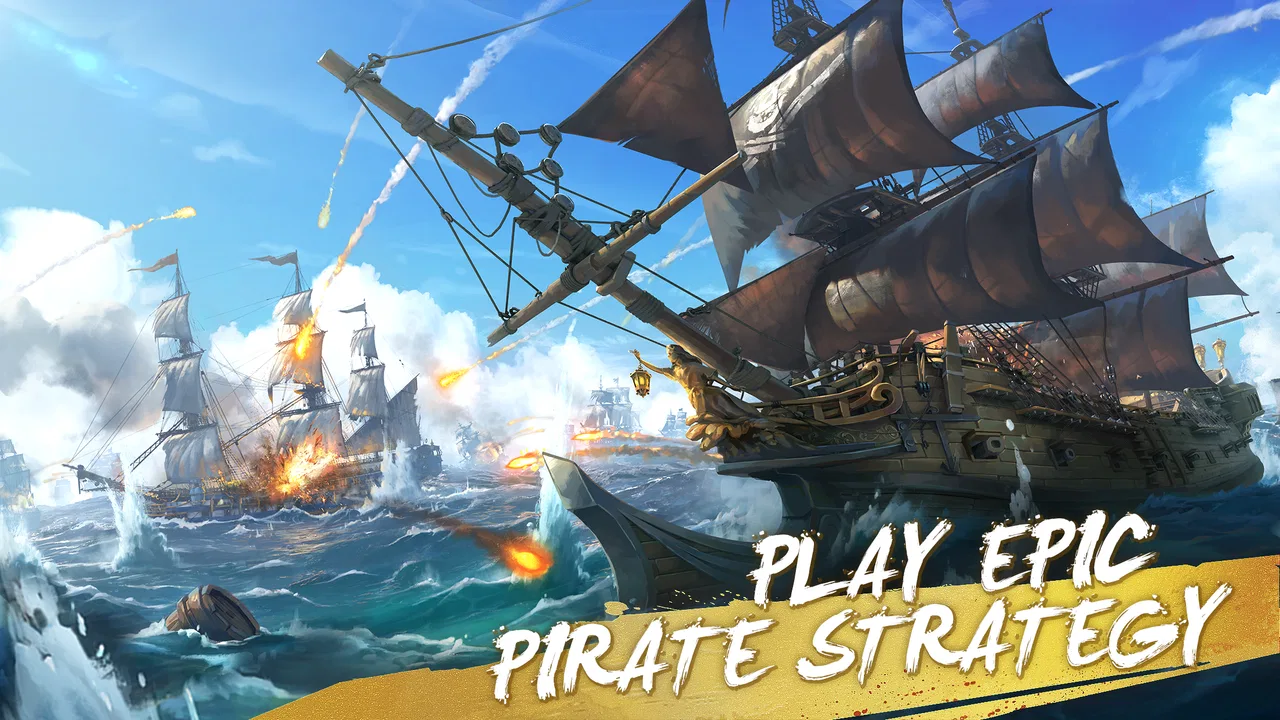
The game is developed by FunPlus International AG and belongs to the strategy category, although it borrows enough from role-playing games to feel more character-driven than a pure board-style strategy title. The store summary presents an epic pirate war experience, but in practice I found the appeal comes from the routine around each confrontation: preparing, improving, checking what is available, and returning to the map with a clearer objective.
You May Also Like

 Blood Strike: 2.5 Anniversary
Blood Strike’s Loadouts Turn Every Drop Into a Tactical Gamble
A close look at Blood Strike’s custom loadouts: how fast access to signature weapons reshapes its battle royale rhythm, rewards preparation, and narrows the gap between fights.

 Pandora - Music & Podcasts
Pandora’s Music Is Easy to Start, but Harder to Recover
Pandora’s strength is its low-effort path from a seed to a station. Its weak spot is how much confidence it asks you to place in connection, setup, and quiet recovery.

 8 Ball Pool
 Is Built on Rivalries, Rematches, and Routine
A close look at the rivalries, rematches, shared routines, and unanswered safety questions that turn a quick pool match into a persistent mobile community.

 Samsung Music
’s Quiet Strength Is Playing What You Already Own
Its reach comes less from spectacle than from dependable access to a personal library. That simplicity is both the app’s strongest retention engine and its ceiling.

 AccuWeather: Weather Radar
AccuWeather Review: A Quick, Clear Forecast for Everyday Decisions
For everyday plans, the best forecast is the one you can understand quickly. AccuWeather makes rain timing, radar, and local conditions easy to act on, with a few trade-offs.

 Hill Climb Racing
Why Hill Climb Racing Still Turns Crashes Into One More Run
A tiny car, a bumpy hill and one more upgrade: Hill Climb Racing keeps resurfacing because its simple chaos makes every near-miss feel personal.
More From Our News Desk



During setup, I would make sure the device has a stable connection and enough free storage before blaming the game if the first launch feels slow or incomplete. A large mobile game can behave badly when the operating system is busy, the connection changes between Wi-Fi and mobile data, or the device is close to its storage limit. Sea of Conquest: Pirate War supports Android 7.0 and later, so compatibility is fairly broad, but an older compatible phone may still struggle more than a newer one.
One useful habit is to let the initial loading process finish before repeatedly closing and reopening the app. If a screen appears to pause, I would wait briefly, check the connection, and only then restart. Rapidly interrupting a first launch can make it difficult to tell whether the game is still preparing content or has genuinely stopped responding. I also recommend keeping the app updated to version 1.1.650 when that version is available for your device, since troubleshooting an older build can create confusion.
The opening experience is easiest to understand if you treat it as a guided tour of the game’s larger loop. Rather than trying to memorize every button, I focused on what each screen was asking me to do next. That approach helped me avoid a common mistake in strategy games: spending early resources just because an upgrade button is visible, without knowing whether the improvement supports the way I actually want to play.
Where the first friction usually appears
The biggest early obstacle is not the pirate theme or the controls. It is information density. A new player can see several possible actions at once, and the game’s broader appeal only becomes clear after those actions connect into a routine. I found it more comfortable to complete one objective at a time, then pause to inspect the next choice instead of tapping through every prompt as quickly as possible.
This is also where the difference between a casual visit and a committed strategy session becomes obvious. If I opened the game with only a minute available, I could make progress, but I was less likely to make thoughtful decisions. When I had a little more time, I could compare possible improvements and avoid using resources on something that did not help my immediate goal.
Players who expect every encounter to be decided by reflexes may feel that the game moves too slowly. Its strongest moments come from planning around your fleet and progression rather than from rapid manual input. That is a good fit for people who enjoy watching a larger campaign take shape, but not for someone who wants the constant intensity of a conventional action game.
Another point worth understanding early is that free-to-play strategy games naturally create tension between patience and spending. Sea of Conquest: Pirate War is free to download, while its in-app purchases range from $0.99 to $199.99 per item. I would not treat the purchase screen as part of the tutorial. My advice is to play long enough to understand what you genuinely enjoy before considering any optional purchase, and to use device-level purchase controls if children also use the phone.
A practical setup routine
My preferred starting routine is simple. I close other demanding apps, connect to a reliable network, check that the phone is not in an aggressive battery-saving mode, and launch the game without immediately switching away. If the display becomes unresponsive, I first give it a moment, then restart the app once. Repeated reinstalls should be a last resort, especially in any game where progress may depend on an account or a connection that the player has not yet verified.
I would also avoid judging performance from the first few seconds alone. A phone can be warm, busy with background tasks, or under temporary network strain. If the game works normally after a clean restart but becomes unreliable later, the problem may be the device’s workload rather than the game itself. Closing unused apps and trying again after the phone cools down is a safer first step than immediately changing several settings at once.
For players using an older Android device that technically meets the minimum requirement, expectations should be realistic. Compatibility means the game can run on that operating system; it does not guarantee the same smoothness as a recent phone. If the experience is consistently uncomfortable, I would test the game after reducing background activity and freeing storage. If that changes nothing, a newer device may be the more practical solution.
Building a reliable play workflow
Once the initial confusion settles, I found the game more enjoyable when I separated “progress” from “activity.” Not every available action deserves immediate attention. I would first identify the next meaningful objective, then use the intervening screens to support it. This reduced the feeling of being pulled through a chain of unrelated taps and made the pirate campaign feel more like a personal plan.
A useful workflow is to begin each session by checking what changed since the last visit. I look for completed tasks, available improvements, and any new decision that could affect the fleet. After that, I choose one priority: strengthening the current position, preparing for a difficult encounter, or advancing a longer objective. This is more efficient than spending everything as soon as it becomes available.
The non-obvious benefit of this approach is that it protects you from your own impatience. Strategy games often make small upgrades feel urgent because they are immediately visible. Saving a little longer can give you a clearer choice, while spending impulsively can leave you with a stronger-looking fleet that is poorly prepared for the next challenge. I preferred making fewer decisions with a reason behind them.
When a battle or objective does not go well, I would not automatically repeat it unchanged. First, I would ask whether the problem was preparation, timing, or simply a mismatch between the current goal and my available strength. Repeating the same action without changing anything is usually the least informative response. A short pause to inspect the situation can turn a frustrating loss into a useful lesson.
Recovering when progress feels stuck
If the game appears to stop progressing, I would separate technical recovery from gameplay recovery. For a technical problem, check the connection, close and reopen the app, and make sure the installed version is current. For a gameplay problem, return to the last clear objective and look for an upgrade, task, or decision that was left incomplete. These are different issues, and treating every pause as a software failure can lead to unnecessary troubleshooting.
If a screen fails to refresh, I would avoid repeatedly tapping buttons or making purchases while uncertain about the result. Wait, confirm whether the action completed, and then restart only if the state clearly has not changed. This is especially important in any connected game because impatient tapping can make it harder to understand what happened after the connection returns.
When reinstalling becomes necessary, I would first make sure the game’s progress is connected to whatever sign-in method the game offers. I would not erase app data casually if I had invested time in the campaign. The safe principle is straightforward: confirm that progress is recoverable before taking a step that removes local information. That advice is more valuable than a blanket recommendation to reinstall whenever something feels slow.
There is also a less obvious form of recovery: take a break from a difficult objective and work on a different part of the campaign. In my experience, this keeps the game from becoming a loop of repeated failure. Returning later with a better-developed fleet or a clearer understanding of the task is more satisfying than forcing the same attempt until the session stops being fun.
When the phone or connection is the real problem
Not every crash, delay, or loading interruption points to the game itself. A weak or changing connection can make a connected strategy game appear frozen, especially when moving between menus or confirming progress. I would test the game on one stable network rather than switching repeatedly between Wi-Fi and mobile data. If the problem disappears on the stable connection, the network is the first place to investigate.
Device heat is another overlooked cause of poor performance. Playing while the phone is charging, running several apps, or using a worn battery can make the whole system less responsive. Closing background apps, removing a thick case temporarily, and allowing the phone to cool can provide a clearer test. If other games and apps are also slow, blaming Sea of Conquest: Pirate War would be premature.
Storage pressure can create similar confusion. When a phone is nearly full, updates and temporary files may not behave well. Freeing space before attempting a major update is a sensible check, and it is less disruptive than deleting the game immediately. I would also restart the device after a large update if the first launch feels unusually sluggish.
Players should skip this game if they strongly dislike connected progression, repeated resource decisions, or the possibility of optional spending. The pirate setting may attract them, but the strategic structure will not disappear just because the presentation is adventurous. A simpler offline puzzle game would be a better choice for short, uninterrupted sessions, while a faster action title would suit someone who wants direct control rather than campaign management.
How it compares with familiar strategy alternatives
Compared with a traditional turn-based strategy game, this title feels more immediate and more mobile-friendly, but it may offer less satisfaction to someone who wants a fully self-contained match with a clear beginning and end. Its strength is the continuing pirate journey: you return, review your position, and decide what to do next. The trade-off is that the game can feel like a long commitment rather than a single solved puzzle.
Compared with a pure role-playing game, it puts more weight on fleet decisions and broader progression than on simply controlling one hero. That makes it a better fit for players who enjoy thinking about the group’s direction. If your favorite part of an RPG is deep character customization or uninterrupted story scenes, you may find the strategic layer more interesting than the narrative presentation.
Against fast multiplayer strategy games, Sea of Conquest: Pirate War is easier to approach at your own pace, at least in the sense that its appeal is not based only on rapid reactions. However, players who want immediate competitive pressure may find the longer development loop less exciting. I would choose it for a relaxed maritime campaign, not as a substitute for a high-speed competitive battler.
The game has a 4.2 average from around 86 thousand ratings, with more than 5 million installs, so it has clearly found a substantial audience. Those figures tell me that it is worth trying, not that every player will enjoy it. Popularity cannot remove the central trade-offs: patience matters, menus require attention, and the free entry point sits beside optional purchases.
Who will get the most from the game
I would recommend it to someone who likes pirate fiction, fleet-building decisions, and games that can be revisited throughout the day. It works particularly well for a player who enjoys setting a small objective before each session: improve one part of the fleet, complete a specific task, or prepare for the next encounter. That sense of continuity is more rewarding than treating every visit as a separate match.
It is also a reasonable choice for strategy fans who find complex desktop games intimidating but still want more depth than a simple tap-to-win experience. The mobile format makes it approachable, while the long-term structure gives experienced players room to make inefficient choices, learn from them, and refine a personal routine.
I would be more cautious recommending it to children despite the Teen rating, not because the rating is unusually restrictive, but because free-to-play purchases can make supervision important. Adults sharing a device should review purchase settings before handing it over. Players with very limited storage, unreliable connectivity, or a strong dislike of waiting should also think twice before committing time to it.
My practical verdict
Sea of Conquest: Pirate War is at its best when I treat it as a continuing strategy campaign rather than a quick pirate-themed diversion. The combination of fleet decisions, role-playing flavor, and repeat visits gives it a clear identity. I especially liked the way a short session could still have a purpose, provided I entered with a plan instead of tapping through every available option.
Its limitations are equally clear. The opening can feel busy, technical problems may be confused with progression problems, and players who want instant action may lose patience. The purchase range also means I would keep spending firmly under personal control. None of those points make the game unplayable, but they do shape who should install it.
My recommendation is to try the free version on a stable connection, give the first sessions enough time to reveal the broader loop, and judge it by whether you enjoy planning your next move between visits. If that routine sounds appealing, this is a solid mobile strategy game with a distinctive pirate setting. If you want a self-contained offline experience or a purely reflex-based battle game, I would choose a different genre instead.
FAQs for Sea of Conquest: Pirate War
01What is Sea of Conquest: Pirate War about?
Sea of Conquest: Pirate War is a strategic mobile game where players assume the role of a pirate captain. The game combines elements of naval combat, resource management, and alliance building. Players can explore vast oceans, engage in battles, and form alliances with other players to dominate the seas. The main objective is to become the most powerful pirate fleet.
02Is Sea of Conquest: Pirate War free to play?
Yes, Sea of Conquest: Pirate War is free to download and play on both Android and iOS platforms. However, it offers in-app purchases for players who wish to enhance their gameplay experience. These purchases can include items like ship upgrades, resources, and special abilities. While these purchases are optional, they can provide strategic advantages.
03What are the minimum system requirements for the game?
For Android users, Sea of Conquest: Pirate War requires at least Android 5.0 and 2 GB of RAM. iOS users need iOS 11.0 or later to ensure smooth gameplay. The game also requires a stable internet connection for multiplayer features and regular updates. It’s recommended to have ample storage space to accommodate future updates and additional content.
04How does multiplayer work in Sea of Conquest: Pirate War?
The multiplayer feature in Sea of Conquest: Pirate War allows players to form alliances with friends or other players worldwide. They can participate in cooperative missions, engage in PvP battles, and compete in global events. Communication within alliances is supported through an in-game chat feature, enhancing strategic planning and coordination among members.
05Are there any strategies to succeed in Sea of Conquest: Pirate War?
Success in Sea of Conquest: Pirate War involves careful planning and strategy. Players should focus on upgrading their ships, managing resources efficiently, and forming strong alliances. Exploring the map for hidden treasures and completing missions can provide valuable rewards. Regular participation in events and battles is crucial for gaining experience and climbing the leaderboards.
Pros
- Engaging real-time strategy gameplay.
- Stunning graphics and visual effects.
- Wide variety of ships and upgrades.
- Active community and frequent events.
- User-friendly interface and controls.
Cons
- Requires constant internet connection.
- In-app purchases can be costly.
- Progression can feel slow at times.
- Occasional server lag issues.
- Limited offline content.

Sea of Conquest: Pirate War
Gallery